Don’t do that, it will make them warmer.
3 Likes
@Dinnye duuude.
Im printing some of your hub wideners for the Rockstar XL.
I’m doing it in petg.
I would like to flatten this tire a bit. Not sure I Will get much change…


I’m trying 15 first.
How wide do you think I can go before I’m in danger?
@BenjaminF did you run these on widened hubs?
3 Likes
My guess is you can stretch it up until the tread is flat… or close to it…? Prob depends on how stiff the sidewall is, can’t stretch as much with stiffer sidewall.
1 Like
15mm stretch is decent amount and with it the hubs still last long. Above 15 you start shortening the life of the hubs. The largest I ran is 35 and that lasted for maybe 1500km total before the hubs were completely dead.
1 Like


I think for this style of tire the most benefit would come from lowering pressures. Idk if they would sit happier on the narrow or the wide one at low pressures. Best to judge from how wide the wear area is in use.
How well stretching works really depends on the specific tire
1 Like
Nope. In fact, I ran them on Fivestars which are quite narrow compared to many modern hub options.
What psi did you like
Something that I think doesn’t get thought about enough is that, afaik, the area of your contact patch is basically directly proportional to tire pressure, and unless you’re running high pressure, and the tire isn’t deforming much, most of the increased area when you decrease the pressure will be from width with rounded tires. Because of the curvature of the tire in the rotation direction, it starts rising too fast for the length of the contact patch to increase a bunch at a certain point.
I never spent the time on it that I wanted to, but I bought some carbon paper at one point and really wanted to systematically look at this. I think wheel width matters way less than you might think at reasonable pressures, once you have weight on the tire.
Edit: Woops I mixed up more and less at first. My whole point was supposed to be that I don’t know if wheel width matters all that much in most situations. I fixed it now 
1 Like
I feel like most of us do it just for looks…
I have mostly chased wide wheels for hubs…
The only tires I think I have used actually deserving of a wide hub were the MBS/exway/newbee knobby 190x70
Would anybody be interested in a 50e skyart 14s3p?
It’s around 3 years old I believe, it’s got some issues though. There is some serious unbalance within the cells. I’m sure it’s repairable but definitely a question mark as to how big of an issue this is and if it’s too risky to revive. I wouldn’t want much for it, just looking to see if anybody might want it to mess around with instead of seeing it go to the dump… it’s a well built battery for sure, just wasn’t taken care of properly by the previous owner.

The lowest group, 12, will go up to about 3.6v but then the BMS shuts off charging because some cells reach full charge.
It comes in a pelican 1120 and has Bluetooth.
(Comes with charger)
2 Likes
This is just from sitting un balanced for so long, go into the bms settings and turn in balancing 100% of the time and let it rest. It will take a week to bring things down because balancing is done usually just on the small window at the top of the charge. Let it sit a week the check back on it. Charge it to the cutoff again and repeat. Let it sit a week. It’s a testament to how good that pack is that it is still good even after getting neglected for so long. Keep cycling it until ot gets the delta back to normal and it should be just fine. Once it is conditioned back to normal then turn the balancing back to charge only.
4 Likes
Woah. So set up balancing without it charging? Would you mind if I DM you to understand this process better?
Edit: So I just needed to flip that balancing only when charging off, or is there more to it?

1 Like
Think I ran them at 40psi, but I’m a big boy on a big board so ymmv
1 Like
Nothing difficult, exactly just that one tab. It should show it balancing in the app so you can confirm. Easy, but now the waiting - it takes a lot of time to balance so don’t even look at it for hours
1 Like
After you turn off Balance Only When Charging, tap BMS write on the top right to make sure it saves the setting.
3 Likes
I set it last night, so it’s been around 12 hours but it still doesn’t show the cells are balancing.
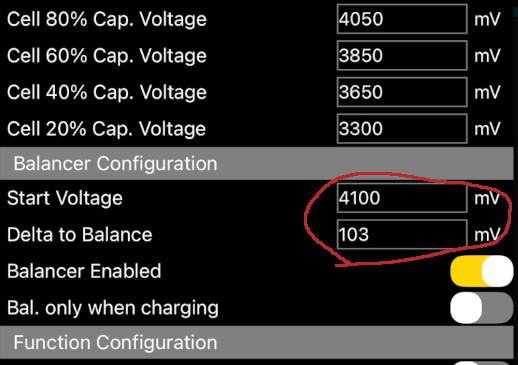
You need to set the Start Voltage to be at least below the highest cell to activate balancing.
Delta to Balance defines where it will stop balancing, i.e., the difference between Start Voltage(highest cell) and Delta to Balance(lowest cell).
Do you have access to the balance plug or leads?
When I have a batt this far out of bal, I manually charge the lowest groups to help the process.
Looks like your highest cell is 4.077, try setting Start Voltage to ~4000 and Delta to ~20,(don’t forget to hit “Write”) and you should see the “Bal” light up yellow on the cell voltage screen.
4 Likes
Don’t know much about batteries so not sure on the balance leads and whatnot, a factor I forgot to mention was that my grandpa had bypassed the BMS to kickstart the charging, don’t really know how he did it.
1 Like
Bypassing the bms to ‘kickstart’ charging likely means one or more Parallel groups was drained below 2.5v.
Charging cells that have been drained below 2.5v carries risks, beyond reduced capacity.
The lower below 2.5v they went, and the longer duration they spent there the more potential for cell damage to have occurred.
I would not want such a battery inside my home, even if it could be balanced.
2 Likes