Yes it is on. it probably is the cable that’s the issue, yet vesc tool knows it’s connected to the vesc but won’t finish the connection process.
vesc tool doesn’t know.
it just tries to communicate and gives that message for any kinda failure. even if it’s not at all connected.
3 Likes
Hmm. I guess I’ll get another cable
2 Likes
What is the difference? When looking up “data cable” it seems they are the same?
If it says it does data it probably does.
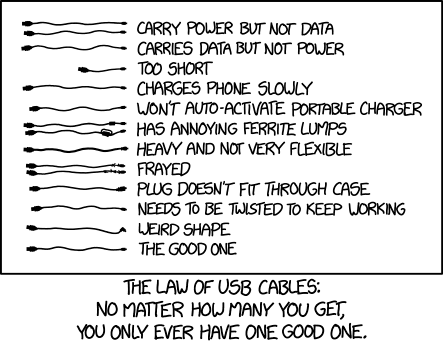
Many micro-usb and even some type-c cables only carry power and no data.
Also, data lines inside of cables can break.
3 Likes
Definitely sounds like a non data cable issue. I ran into this once while setting up a VESC. Got a new cable and it was fine
1 Like
Ok, I’ll get a data cable
1 Like
It worked!!
8 Likes
A little unsolicited advice: mark that cable and put it somewhere safe it won’t get borrowed or used. Fsr people love to borrow my good data cables and break or not remember to return them 
5 Likes
Good advice
How do I connect my vx2?


Maybe something to do with firmware? I just updated it, but they still say “ this version of vesc tool does not include any firmware for your hardware version”
How do I update that?
Looks like the wizard doesn’t have the remote config.
After doing the wizard, on the vesc that the remote is connected to, go into your app settings and change “app to use” to UART
Mboards posted a couple great videos on vesc config recently, recommend you give them a watch if you haven’t already.
Here’s one;

3 Likes
Relevant xkcd
8 Likes
They should be kept at 3.55V ish for long term storage. That’s what voltage I receive most of my cells at anyways.
1 Like
The remote just won’t pair with the receiver
Maybe?:

1 Like
I guess ill try it again
I was under the impression that 3.5ish volts was primarily so that manufacturers/resellers are able to ship cells with less energy in them (and I think therefore less fire risk) without causing substantial damage while 3.7-3.8v is more optimal for long term storage.
Our Lord and Savior @Battery_Mooch can maybe clarify this.
3 Likes
Throw it in the bin and get a puck
3 Likes