
What do I update? I just reinstalled the phone app and the Watch app.
Also getting “failed to connect to Wi-Fi” after configuring that on the phone.
Also getting “failed to connect to Wi-Fi” after configuring that on the phone.
Really appreciate the detailed response. Y’all are truly the gold standard for the support you provide here.
Great feature, for sure!
It’s actually the exact opposite situation, I got the Megan used, and it’s still got all of Ash’s data on it. Curious what’s going on here…
definitely should’ve been more detailed with with I was trying to do 
Setting up the Megan onto Nothing Fancy, I wanted to make sure the logs were clear. When I went to the records page and hit sync, it shows a “downloading record X of 430-something”. When I did that, I quickly force closed the app to stop the upload of all those records (because I didn’t want to need to delete the one-by-one haha)
I then re-formatted the Megan’s file system (in an attempt to remove the logs before I synced/downloaded them to my phone/cloud), getting the error that I posted about.
When I reconnected on the app and clicked sync, it still tried to download 400-some records (I force closed again.). A couple did download before I did this, and checking the records, they were definitely Ash’s old ones.
Thinking something had failed during formatting, I posted the picture trying to solve the reformatting issue, thinking I could solve my issue trying to reset records 
If there’s a way that I could save the records for Ash that’d be pretty cool (but he said he didn’t care about them so nbd).
If you can’t think of a way to go about resolving this, this seems like a reasonable-enough resolution. Sync from the Megan, then delete from the web interface. 
btw, I love that you’ve recorded which Megan data was recorded on. Probably only a handful of folks that will ever benefit from that, but as someone that now has two Megans, this is so cool
I didn’t see that one. Nice Megan save there!
If Ash creates a Cloud account, we can move the records there. If you want to do that, PM me your and Ash’s username and I will take care of it.
I understand you were using Metr app, that one still does not support user accounts, and all the old records have to be deleted manually. Sorry about that. If you are sure Ash doesn’t need them, you can let the sync finish and then press and hold on some record, then you can select multiple and delete (there is no “Select all” button, sorry about that again). But maybe Jan can transfer Ash’s records first before you do this.
Yup, good catch. ngl I forgot there were two apps. Always just used Metr 
So I downloaded Voyage Connect for the first time and logged in. It asked for me to associate the Megan with my account, which I did.
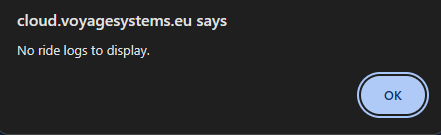
As expected, I’ve got no ride logs. If I swipe up to refresh, still no ride logs.
Closing the app (to free bluetooth) and opening Metr, hitting sync records, it starts downloading all the records on there.
(I grabbed a screenshot before I forced closed haha)
very weeeeeirrrd.
From what I understand, it appears that this isn’t true in this case.
The plot thickens! If I go onto the voyage cloud, I see the megan has been registered with my account. However, it shows 373 logs… Shouldn’t it show zero, because they are all associated with Ash’s account?
Another potential data point that I noticed; I renamed the Megan to “NothingFancy”.
Both Voyage Connect and Metr shows the new name.
However, on voyage cloud, It shows Ash’s old name, “Sidewinder”. Puzzling.
Clicking around, learning how to use Voyage cloud now, y’all have a cool platform here!
Though, something’s definitely not right haha.
If I go to garage and click on the logs button
I get to see a list of all 373 of Ash’s logs, which I can open and view everything, including GPS. 
However, clicking on “map” gives me a nice message
Yet another confusing fact - Ash told me (via telegram) that he has access to all the logs on his cloud account.
I was able to find his profile, (#9 on all-time distance, nice!), and it looks like everything’s proper over there
I will have a look. We might have some bugs. The data models are ready to support logger devices changing hands and logs staying with the original owners but the code may need some tweaks. You’re the first one exercising this particular functionality.
Edit: I think the problem is that the Megan is still linked to Ashe’s PEV (Sidewinder) but it’s also linked to your account, which is an invalid state that we should not allow. Unlinking it from Sidewinder should fix things, at least in the Voyage Cloud / Voyage Connect. The legacy systems (Metr app, Metr server) may still have issues. We will need to figure out what to do there. It’s not easy.
@tuckjohn: Bugs fixed. Here’s how everything should look now:
The logs are linked to Ashe’s Sidewinder, he can still access them and they count towards his stats.
Megan (mega3D) is linked to your account but you can no longer see the logs that are linked to mega3D but at the same time are not owned by you (i.e. Ashe’s logs). This I had to fix; I was missing the user filter there.
Any logs created on mega3D henceforth will automatically be owned by you (since you are now the mega3D owner) and therefore only you will be able to see them.
Let me know if anything still looks weird.
Those are different things.
If you “rename” Megan, that changes the BLE device name. That’s the name Megan will show when advertising it’s available to connect over Bluetooth. This name is not displayed anywhere in the Cloud.
The “Sidewinder” that was showing up in the Cloud is the name of the PEV that Megan was (incorrectly) linked to. You can create a new PEV record in your Voyage Cloud Garage with your board picture and description. Then you can link your Megan to it.
PEVs and logging devices are different entities. Though they are usually one-to-one, there are cases when you can have multiple logging devices on a PEV, or you can have a PEV without a logging device (e.g. Ashe’s Sidewinder now) so we decided to keep them separate to be able to model these special cases correctly.
Yay! Edge cases. Isn’t software fun
Sweet, matches what I see on my end. Happy we got it fixed, kuttos for being so quick about it!
Ah, cool! With that understanding, makes sense. Good design choice
I’ll have to play around with configuration and set stuff up properly.
Still seeing the 400-whatever logs on the Megan on the Metr app. I assume that’ll require a software update to the Megan/IOS app instead of the cloud
Little concerning that logs are intended to be deleted after uploading to the cloud but they’re still present on the device… might be worth looking into the code that handles that deletion (though I suppose you already figured this haha).
Perhaps a check on the app that checks if a log UUID is already in the cloud, and if so, deletes the local record?
Idk I’m just a aerospace guy that exactly just competent enough with software enough to be dangerous.
When you figure it out, I’d love to know what caused such an edge case with the logs to stick around! Very curious, always love learning.
The logs you’re seeing are actually not “on the Megan”. The deletion does work correctly. What you are seeing are logs on the Metr server that got synced to the Metr app. Let me explain.
We currently have two worlds:
When Megan uploads logs, they go to both worlds. These two worlds are mostly independent, though there’s a little bit of synchronization. In particular if you delete or merge logs on one world, the change propagates to the other world. Other changes are not synchronized though.
The specific case that you’re having is a good example. If a device changes hands, we can model that well in the new world because we have user accounts.
Unfortunately, the legacy world doesn’t have the concept of a user account. Each logging device (Megan, Minnie, Metr) is basically a user account. Therefore, in this world, if you own a logging device, you also own all its logs. In the past, users would simply delete all their logs before passing the logging device on another user.
We need to figure this out. At this point, you can’t simply delete logs from the legacy world and be done with it because the deletion would propagate to the new world and the logs would be lost there too.
I think we need to implement a “new world only” mode for given logging device. This would ideally still allow using the Metr app but the ride logs would no longer be available on the Metr server and in the Metr app. This is a bit challenging so please bear with us.
I hope all features from Metr are migrated to Voyage app - i really like the expert mode where i can use terminal and even change parameters of flexibms
You have to update your Minnie firmware. Voyage Connect > Settings.
did more riding yesterday
still funky logs
Mar 20, 2025 - metr.at | Gz4gy 0km
Mar 20, 2025 - metr.at | HljSo 0km
^i took a minute stop to work directions, and it either didn’t continue logging or it did but it didn’t save data for whatever reason
Mar 20, 2025 - metr.at | A4nzg this is the end of the ride i guess? all i did was turn the board off, unsure if the uhhhh phone was connected or not
Every time I hit that, or the account button, the app freezes.
You bet, totally fair! I can see that’s not an overnight feature to add
hey guys - heads up - “forgot password” feature is not sending any emails on Voyage cloud.
heads up #2 - you can register multiple times (many users) with the same email, not sure if this is by design
It does work. I just tested it. Maybe it just went to spam?
I don’t think it’s a big issue but it does make the password reset a bit weird so we should probably disallow that.
Hm, did you register multiple accounts with the same email? Maybe that’s why the password reset doesn’t work for you.
Sorry about that. I will have a look and fix, hopefully tomorrow! Have you tried beta version of the app? You can find beta invite link earlier in this topic.


