Thanks for writing all that, that makes a lot more sense. The charger that came with it is only 1.5a.
Edit:

Why does it still show 100% and pack over volt if all the settings are right

Thanks for writing all that, that makes a lot more sense. The charger that came with it is only 1.5a.
Edit:
double check battery over volt setting?
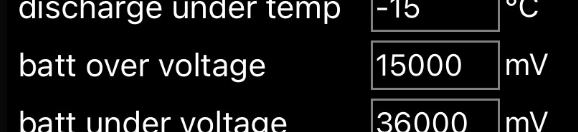
Oh lol I see now
Now it registers at 0% but the charger is messed up so I think I’m going to try and use my other 4a charger, how can I safely solder a xt60 instead of the jack on the battery?
I suggest you do one thing at a time.
I wouldn’t worry about the percentage, it’s known to be wonky.
I don’t see what else to do when it comes to firmware, I think I’m just going to try the 410/411/412 you posted.
I think this path from @xsynatic is a working path to fixing firmware.
Specifically
Wish me luck.
yeah same. I swear i used to be able to change the hardware pull down in vesc_tool bfore but now i only get Unity on my unity.
even in the vesc archive i can’t change which hardware it’s willing to show.
Messing with soldering on the battery side of things is always kind of risky. If you have charge and discharge turned off, and it’s after the BMS, it should be pretty safe, though you do still need to be careful the positive doesn’t touch the BMS or something.
The safest and easiest thing is to just make a little adapter to put between the charger and whatever the battery already has.
It’s a female xt60 on the charger and a DC barrel jack port on the battery, not sure if it’s 2.1 or 2.5.
Those bms settings are 100% cooked
Is there a way to reset to default?
The trigger condition is when you want the bms to take action. So for battery overvoltage, you want it set at something like 4250mv. This way, if any cell reaches 4.25v, protections kick in.
The release value is when you want that protection to stop, so for overvoltage protection, i can’t remember what the default is, but you could probably set that at around 4200mv.
Currently your battery overvoltage is set at 15000mv which if the bms didn’t know any better, would let you charge your 4.2v cells to 15v. But i’m 95% certain the bms is ignoring that last 0 and cutting your pack off at 1.5v per cell.
But thats just one value. There’s others there that are cooked as well. Resetting to default liion settings is your best bet
idk a way to do this.
totally agree they are cooked.
But fess showed me how to put more accurate settings in…?
and we need to confirm… ALL the settings… cause those numbers were sketch and make no sense.
and we should probably figure out if we can glitch it again… plug/unplug. idk what else.
So I need to confirm the settings on the battery and figure out how to make the xt60 and jack port compatible.
set it all.
then look it over. and think about wether it seems right.
then take clear screen shots and post it.
wait to see if any of us call it wrong still…
options
a.) make an xt60 to dc barrel jack adapter (note 5.1 and 5.2 barrels exist. size of pin is bigger on 5.2 )
I like this way because all my chargers are xt60, and i have adapters for everything else.
note however dc barrel jacks aren’t that great for current. 2A good. 4-5A a the edge. if you run 4A through it… monitor it at first for it getting to warm.
b.) just put a new barrel end on the existing 2A charger. this is half the steps of option a. both require DC barrel.
